


When faced with a sluggish PC, the immediate solution for many might seem like purchasing a new computer. However, there exists an alternative that presents a cost-effective approach: investing in a system optimization tool such as IObit Advanced SystemCare Pro. This software provides an extensive range of features dedicated to enhancing system performance, surpassing the offerings of IObit Advanced SystemCare Free. It introduces real-time optimization, a more thorough Windows registry cleaner, and supplementary functionalities. While Advanced SystemCare Pro may not fully parallel the performance optimization capabilities found in competitors like AVG TuneUp and Iolo System Mechanic, it remains a compelling choice for elevating system performance through premium cleanup, all while maintaining an appealing price point.

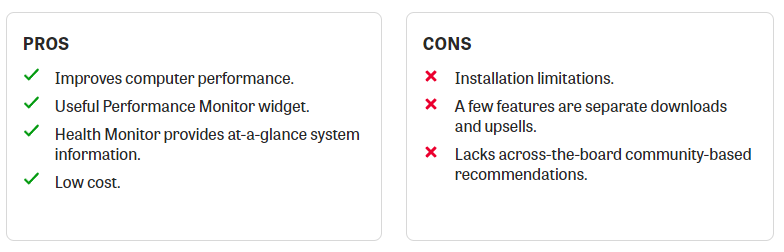
IObit pros and cons
Pricing and Compatibility
Advanced SystemCare offers three versions: Free, Pro (the focus of this review), and the security-focused Ultimate. The Free version provides basic security protection, system optimization, backup and restore features, privacy protection, and a Speed Up feature that eliminates junk files and defragments the Windows registry. The Pro tier, priced at $19.99 per year, enhances the package with features such as real-time system optimization and malware protection. The Ultimate tier, available for $29.99 per year, introduces an array of security tools to safeguard against Trojans, worms, viruses, and other threats. For further information on the fundamental features included in Advanced SystemCare Pro, refer to our Advanced SystemCare Free review.
In comparison to Editors’ Choices like AVG TuneUp and Iolo System Mechanic, Advanced SystemCare 9 Pro has license limitations: the software can only be installed on up to three computers. This limitation might be problematic for households with multiple PCs. However, if this isn’t a deterrent, the software is compatible with Windows 10, 8, 7, Vista, and XP. Advanced SystemCare Pro boasts a lightweight download, ensuring a swift and hassle-free installation process.
New and Returning Tools
Advanced SystemCare Pro introduces a variety of new tools aimed at enhancing system performance and bolstering security. On the system side, there’s the revamped IObit Undelete, capable of recovering files from both internal and external storage, and an updated disk optimization engine that enhances overall disk performance. The security-focused tools include Security Reinforce, which identifies and addresses system vulnerabilities, and Homepage Advisor, designed to detect changes to your homepage and search engine settings to prevent browser hijacking.
When launching the program, you’ll be prompted to initiate a system scan by clicking the Scan icon available in the widget and the desktop application. This prompts Advanced SystemCare Pro to thoroughly examine your PC for issues and initiate necessary fixes—a standard procedure for PC tune-up utilities.
Advanced SystemCare Pro offers several features that are either enhanced or not present in the Free version. These include Disk Cleaner, which removes unnecessary files, Internet Booster, designed to enhance your PC’s Internet connection speed, and Registry Cleaner, which repairs problematic entries in the Windows registry. The Pro version also provides real-time system optimization, helping to maintain system efficiency on-the-fly. These features align with the offerings of other premium tune-up utilities like Iolo System Mechanic and SlimWare Utilities SlimCleaner Plus.
Differing from Advanced SystemCare Free, Advanced SystemCare Pro features a valuable desktop widget called Performance Monitor. This widget provides real-time information about your PC’s CPU, disk, network, and RAM usage. Additionally, it alerts you when these elements are operating at high capacities. The Performance Monitor includes shortcut icons for actions such as shutting down your PC, terminating processes, capturing screenshots, and executing other useful tasks. It provides a convenient way to access essential information about your computer without launching the full-scale Advanced SystemCare Pro application.
Performance Improvements
To evaluate Advanced SystemCare Pro’s effectiveness in rejuvenating PC performance, I conducted two tests: one using the Geekbench system performance tool and another measuring boot times. These tests were performed both before and after applying the software in order to assess any changes in the computer’s speed. Each test was conducted thrice, and the average results were recorded.
Before subjecting the system to optimization, a 2GHz Intel Core i7 X990 Style-Note notebook featuring 4GB of RAM and an 80GB Intel SSD drive achieved a Geekbench score of 5,914 and exhibited a boot time of 50.3 seconds.
Upon running Advanced SystemCare Pro, the system’s performance demonstrated improvement. The Geekbench score escalated to 6,104, albeit trailing Anvisoft Cloud System Booster’s leading score of 6,328 by slightly over 200 points. Notably, the boot time decreased to 44.2 seconds, which was behind AVG TuneUp’s quicker boot time of 30.9 seconds. Despite these disparities, it’s worth highlighting that Advanced SystemCare Pro had a clear and positive impact on the PC’s performance.
After completing the tests, I extensively utilized the computer to gauge the software’s influence on responsiveness. The outcome was evident—Advanced SystemCare Pro delivered a noticeable boost in performance. The entire operating system exhibited a more rapid response, even when simultaneously running resource-intensive applications like iTunes and Steam.
Makes a Real Difference
IObit Advanced SystemCare Pro stands out as a remarkable tune-up utility that effectively enhances PC performance. While it may not fully match the standards of AVG TuneUp and Iolo System Mechanic, both recognized as Editors’ Choices in the category, Advanced SystemCare Pro comes close and offers a more budget-friendly option. It’s worth noting the limitation of license and the need to download additional software (some of which require payment) for a complete tune-up experience, which can be unfortunate. Nonetheless, Advanced SystemCare Pro remains a reliable and solid application for optimizing your PC’s performance.
The Bottom Line
While IObit Advanced SystemCare Pro effectively revitalizes sluggish PCs, it does have a couple of issues that prevent it from being our top choice among tune-up utilities.


