



Which security software offers the best protection for your PC? We’ve extensively tested, evaluated, and ranked nearly 40 applications to assist you in selecting the finest security suite for safeguarding your devices and personal information.
It all starts innocently enough. You realize that your antivirus isn’t sufficient to protect your data beyond your device, so you add a VPN app. A security-conscious friend advises you that “password” is a terrible choice for a password, prompting you to adopt a password manager. And when your child stumbles upon a inappropriate site instead of cartoons, you recognize the value of parental controls. Before you know it, you’ve amassed 17 different apps in the pursuit of security and privacy, leaving your computer sluggish and your wallet thin. Avoid falling into this trap! Instead of assembling a patchwork of security solutions, opt for a comprehensive security suite that integrates all the essential features into a single program. Your computer’s performance and your finances will thank you.

While some security companies create suites with only the most essential components, others incorporate a wide array of security elements. So, which security solution should you go for? We’ve meticulously reviewed nearly 40 suites and compiled a list of the best options, ranging from straightforward entry-level suites to cross-platform, multi-device comprehensive solutions. In this article, we present the top suites we’ve put to the test, along with their distinctive features and how they can cater to your needs.
This article briefly introduces the range of tests we utilize to evaluate security suites and identify the finest among them.
1.Norton 360 Deluxe – Best for Full-Featured VPN
Reasons for Our Selection
When investing in a security suite, an implicit commitment is made to ensure your safety. Norton 360 Deluxe takes this commitment a step further by explicitly guaranteeing your protection. By opting for auto-renewal, you can rest assured that Norton’s support will promptly address any malware breaches that manage to bypass the application’s defenses. This level of protection is truly formidable, as demonstrated by the consistently high ratings awarded by independent testing labs we closely monitor. Norton 360 Deluxe excels not only in evaluations but also in our hands-on assessments.
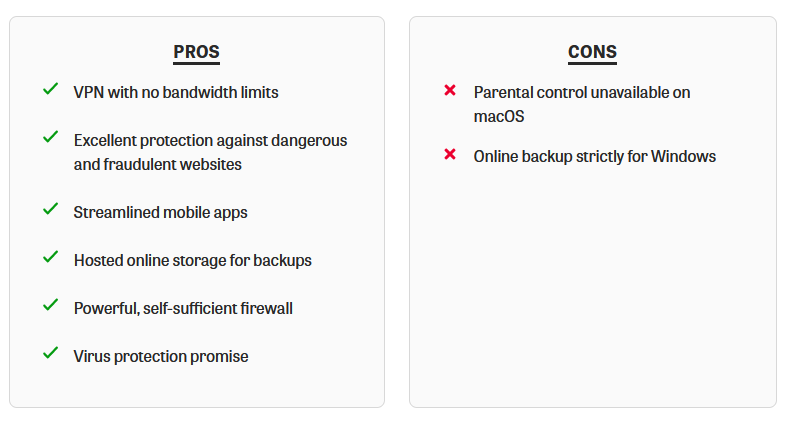
This comprehensive suite encompasses a powerful and intelligent firewall, a fundamental password manager, and a local spam filter. Additionally, it incorporates a vigilant dark web monitoring system designed to promptly alert you if your sensitive information becomes compromised. Notably, the standalone parental control system has earned the distinction of being an Editors’ Choice. With your subscription, you gain the ability to safeguard up to five devices running on Windows, macOS, Android, or iOS. Furthermore, the package includes five complete licenses for Norton’s VPN—an uncommon offering, considering that many other suites require additional payments to remove limitations from their provided VPN components. As an added bonus, you receive 50GB of online storage to facilitate your backup needs.
Who It’s For
Norton’s lineage of security software extends over multiple decades, garnering a substantial following of loyal supporters. Opting for Norton is a prudent decision for individuals seeking a tried-and-true suite that comprehensively addresses all security aspects. However, it particularly shines for individuals who make the wise choice of fortifying their online connections through a VPN.
Pros and Cons of Norton 360 Deluxe
2. Bitdefender Internet Security – Best for a Wealth of Bonus Features
Reasons for Our Selection
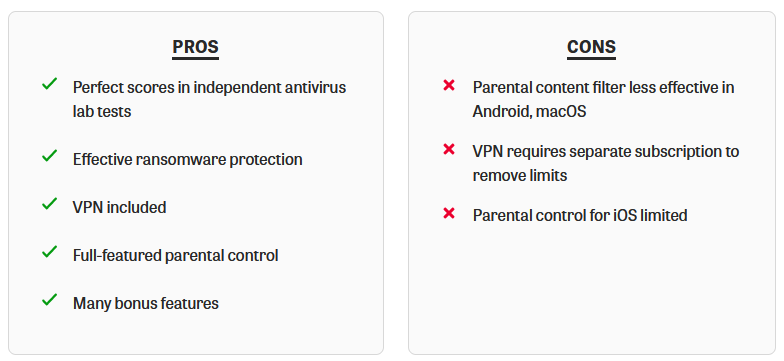
Bitdefender’s standalone antivirus software surpasses the feature offerings of certain so-called comprehensive suites, and the Bitdefender Internet Security package elevates this further. The foundational antivirus technology consistently garners impeccable and nearly impeccable ratings from independent testing laboratories. Notably, its specialized protection against ransomware excelled in our assessments. Among its standout attributes are a seamless firewall, a straightforward spam filter, efficient password management, secure file shredding, a robust parental control system, and more. All of these protective elements are enveloped in an AutoPilot mechanism that allows you to relax and relish your security, requiring minimal interaction.
Bitdefender also incorporates a VPN, although with certain limitations. The selection of specific servers is not possible, and daily bandwidth usage is capped at 200MB. While this allocation suffices for testing the VPN safeguarding, individuals seeking substantial VPN use will need to consider an upgrade for extended usage, which entails an additional cost.
Who It’s For
Perhaps you find yourself in a dilemma, torn between two options. On one side, there’s the desire for a security suite that encompasses all vital security elements. On the other side, the last thing you want is those components constantly vying for your focus while you’re engrossed in work, gaming, or simply enjoying a video. Can you relate to this scenario? If the answer is yes, then Bitdefender Internet Security is the ideal solution for you. With its array of components expertly managed by the AutoPilot feature, you can finally strike the balance you seek.
Pros and Cons of Bitdefender Internet Security
3. Avast One Platinum – Best for Families
Reasons for Our Selection
Instead of the traditional geometric patterns, Avast One Platinum adorns its interface with vibrant splashes of color, playful doodles, and cheerful individuals. If your preference aligns with superior scores from reputable labs, you’ll find cause for contentment here. Avast consistently garners top marks from various testing labs, establishing a near-perfect record across most evaluations. It also ranks among the highest performers in our hands-on assessments. Notably, its comprehensive scan operates at an impressive speed, surpassing that of many competitors. In scenarios where malware interferes with the Windows system itself, Avast’s boot-time scan effectively resolves the issue. Furthermore, it effectively thwarts ransomware attacks by blocking unauthorized file modifications.
While antivirus safeguards your data locally, a VPN ensures its security during transmission. Avast’s VPN might not be the most feature-rich, but it offers unlimited usage. Alongside its distinctive security attributes, Avast has the ability to safeguard sensitive documents from unauthorized access, even within other accounts on the same computer. It also prevents untrusted programs from utilizing the webcam and verifies if any of your passwords have been compromised in a data breach. Additionally, the suite includes performance-enhancing features that are unrestricted compared to the limitations in Avast’s free edition.
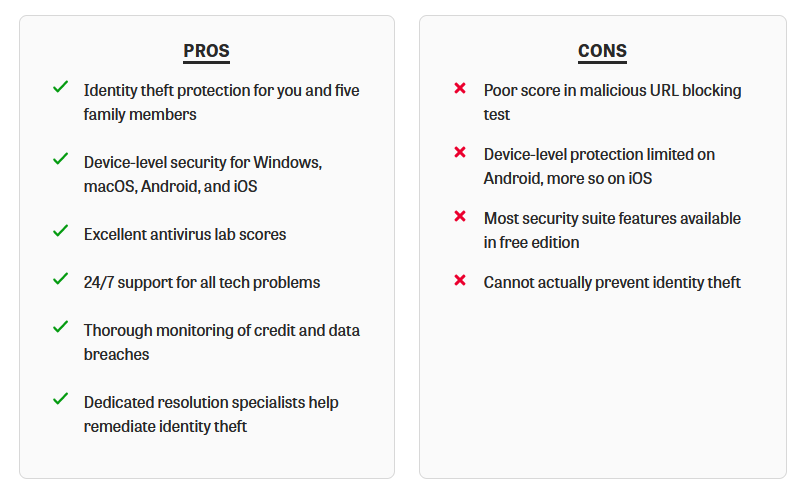
Beyond its robust device-level protection, the Platinum subscription extends coverage to identity theft for you and up to five family members. It proactively alerts you about potential data breaches and other risks, facilitating access to dedicated resolution experts. Avast pledges up to $2 million to rectify any resulting damages. Moreover, you gain access to 24/7 tech support akin to concierge services, catering to all your technical queries and concerns.
Who It’s For
Avast is a globally recognized brand, familiar to households worldwide, with millions entrusting its free antivirus solution. If you’re someone who appreciates Avast and wishes to elevate your security measures while also incorporating comprehensive identity theft protection for your entire family, this suite presents the ideal solution.
Pros and Cons of Avast One Platinum
4. McAfee+ – Best for Multi-Device Households

Reasons for Our Selection
You’ve taken the step to secure your PC, Mac, and mobile devices. However, what about the devices your partner uses or the multitude of electronic gadgets that captivate your children? Securing all these devices might seem like a significant expense, unless you explore the option of McAfee+. This comprehensive suite offers the remarkable advantage of safeguarding every device within your household, regardless of whether it operates on Windows, macOS, Android, or iOS. It even extends its protection to Chromebooks and laptops with ARM architecture. This encompassing security coverage incorporates the use of McAfee’s VPN, without any restrictions on bandwidth or server selections. Moreover, the suite includes an array of valuable security enhancements. Notably, its antivirus component excels in our practical protection evaluations.
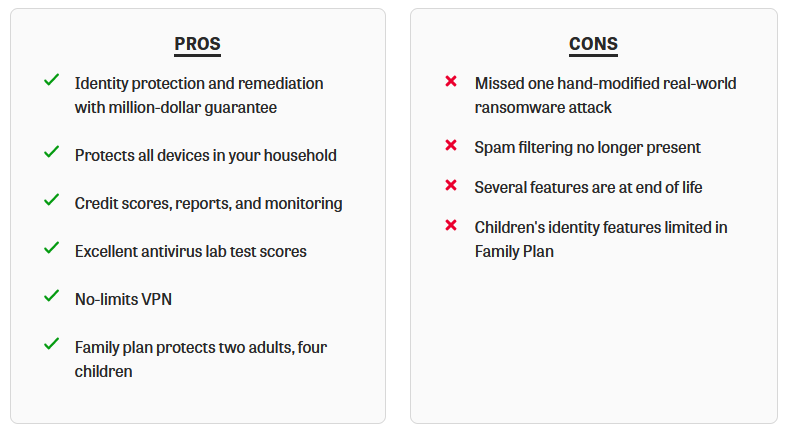
McAfee+ is structured into three tiers: Premium, Advanced, and Ultimate. At all three levels, you benefit from fundamental Dark Web monitoring for your personal information. The Advanced and Ultimate tiers, akin to Norton’s LifeLock, feature comprehensive identity theft monitoring and remediation. While it may not cover as many facets of your identity as some other services, it addresses the critical ones. Furthermore, similar to LifeLock, it comes with a guarantee. In the unfortunate event of identity theft, McAfee pledges to expend up to a million dollars to support your complete recovery process.
Who It’s For
If your living situation involves a rent-controlled apartment in Manhattan with just your cat, Mac, and iPhone, this suite might not align with your needs. However, if your household is bustling with digitally connected individuals, it could prove to be an invaluable solution. Whether you have over 10 devices or even more than 20, there’s no need to fret—this suite has got them all protected!
Pros and Cons of McAfee+
5. Trend Micro Maximum Security – Best for Cross-Platform Users

Reasons for Our Selection
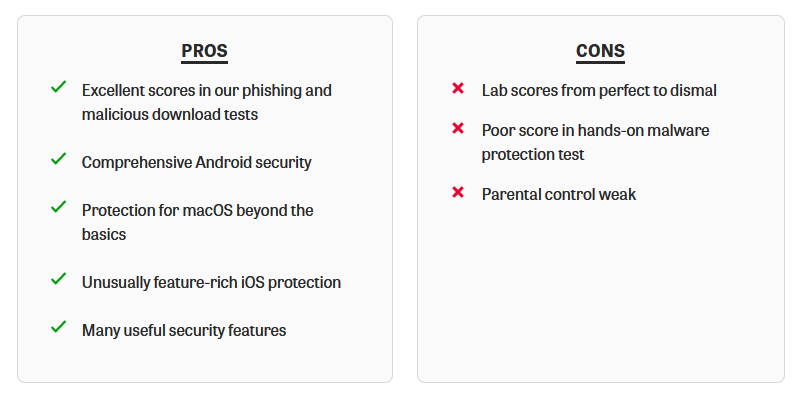
When it comes to security for your devices, your preference is undoubtedly for maximum protection. Look no further than Trend Micro Maximum Security, which provides comprehensive coverage for devices running Windows, macOS, Android, and iOS. While the antivirus testing labs we monitor regard the Trend Micro antivirus engine as a significant contender, it may not always secure the highest scores. However, it has demonstrated strong performance in our hands-on tests, effectively guarding against malware-hosting websites and phishing scams.
For Windows users, Trend Micro offers an extensive range of features, including multi-layered ransomware defense, transaction protection for online activities, a PC Health Checkup system, a scanner to detect privacy gaps on social media, advanced encryption for sensitive documents, and a file shredder to securely delete original files after encryption. Some aspects like parental control, basic password management, and Outlook-exclusive spam filtering might not be as impressive. Nonetheless, the suite’s overall assortment of security features is noteworthy.
Contrary to the common pattern where Windows enjoys more features in cross-platform suites, Trend Micro ensures that macOS receives significant attention as well. The macOS edition excels in lab scores and performs malware scans upon access, demand, and scheduling, including scans of removable drives. Additional attributes comprise ransomware protection, detection of web-based threats, prevention of unauthorized camera and microphone usage, parental control, and the same social network scanning as available on Windows. Android users are also treated to a feature-rich security suite, while iOS devices benefit from more protection compared to most other offerings.
Who It’s For
While Trend Micro Maximum Security offers an abundance of features on Windows, there are some minor drawbacks to be aware of. However, on macOS, Android, and iOS, this suite truly shines and surpasses its competition. It becomes an excellent option if your security needs encompass multiple platforms, and its appeal is even stronger if Windows is not your primary operating system.
Pros and Cons of Trend Micro Maximum Security
6. ESET Internet Security – Best for Techies
Reasons for Our Selection
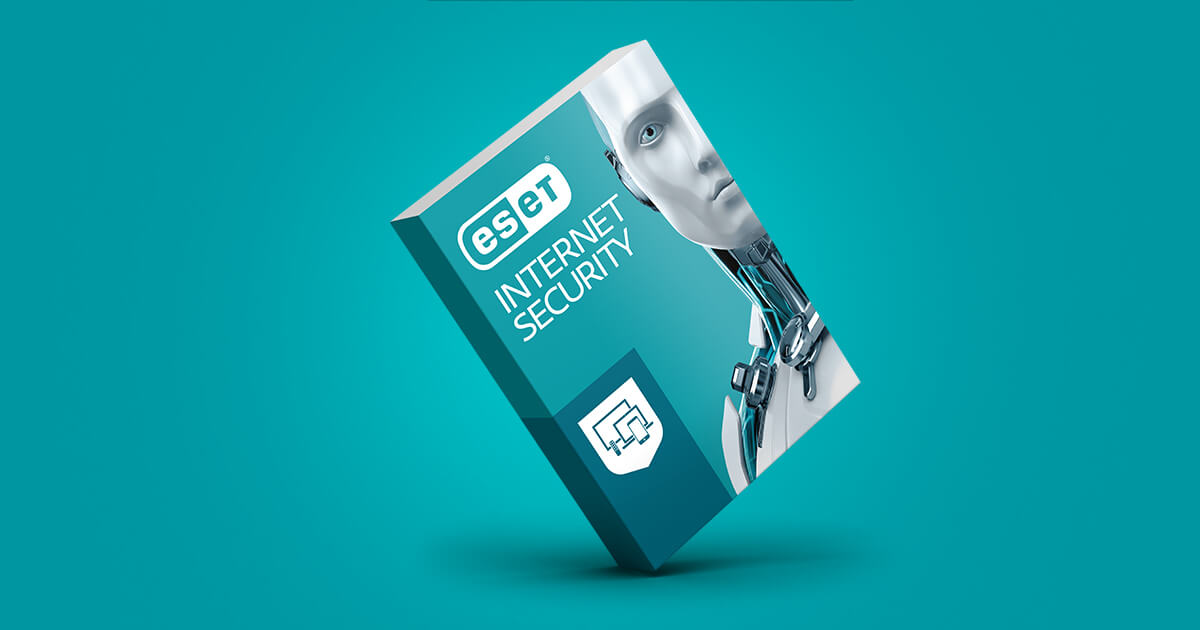
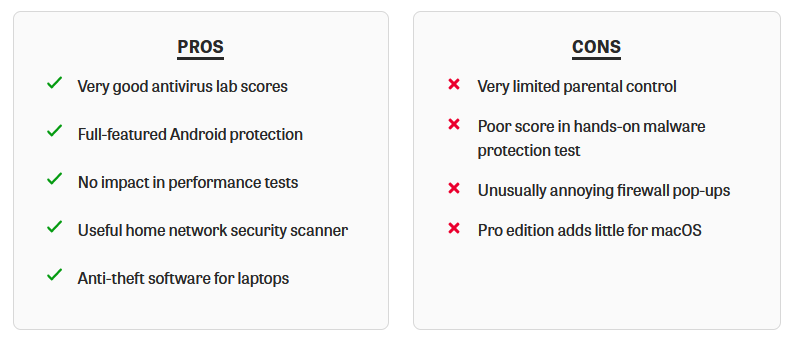
The futuristic blue-eyed cyborg greeting you in ESET Internet Security’s main window is a clear indicator of its tech-oriented nature. This suite stands out with features like Device Control, granting you meticulous control over the types of devices that can connect to your PC. For instance, you can block USB drives generally while allowing usage only for devices you’ve personally approved. ESET Internet Security is equipped with a comprehensive set of security tools, catering to both average users and those possessing substantial technical expertise.
One of its standout features is the Network Inspector, which allows you to monitor all connected devices on your network. You can even receive notifications about new device connections and it scans for security issues, such as unauthorized open ports. While a similar feature was once offered by Avast, ESET’s Network Inspector remains noteworthy. Additional features of ESET include a firewall, spam filter, laptop anti-theft capabilities, webcam security, banking protection, and a somewhat limited parental control system.
However, ESET’s performance in core antivirus protection exhibits some variability. Test scores from two labs span from average to excellent, but it performed poorly in our hands-on malware protection test. Nevertheless, it fared well in safeguarding against malicious and fraudulent websites. ESET’s Android edition boasts an extensive array of security attributes, earning high marks from various testing labs. For Mac protection, ESET offers antivirus, firewall, parental control, and simplified device control. Although the labs no longer assess it extensively, it did not perform well in one of our hands-on tests.
Who It’s For
ESET Internet Security boasts numerous features that demand an unusually high degree of technical proficiency. If you happen to possess such expertise, this suite is tailor-made for you. You’ll effectively utilize tools like the Network Inspector to comprehensively monitor your devices, capture system status snapshots using SysInspector, and meticulously craft a precise set of device control rules. If you belong to the rare category of individuals with these technical skills, this suite is an excellent fit for your needs. However, if you don’t fall into this category, it might be advisable to explore other options more aligned with your proficiency level.
Pros and Cons of ESET Internet Security
7. F-Secure Total – Best for Multiple Licenses
Reasons for Our Selection
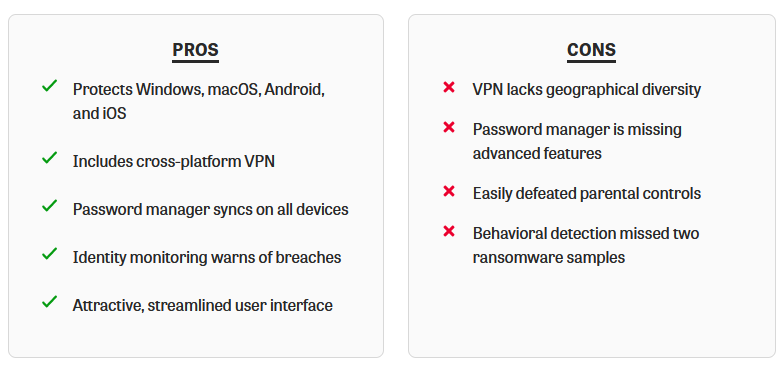
F-Secure’s introductory suite may appear somewhat modest in terms of features, but F-Secure Total shifts the balance towards the opposite end of the spectrum. This advanced suite introduces several additions, including a cross-platform VPN, a password manager, and a monitoring tool that alerts you if your personal information surfaces in a breach. Notably, the pricing for F-Secure Total is competitively structured, particularly appealing for those seeking 10 or more licenses.
The integrated password manager effectively handles the essential tasks, although it does not automatically fill web forms with personal information. It also lacks certain advanced features like secure sharing, password inheritance, and multi-factor authentication.
The uncomplicated VPN seamlessly integrates into F-Secure Total and boasts user-friendly operation. It incorporates practical functionalities such as a Kill Switch and split tunneling. However, its server network is relatively limited when compared to the offerings of the top-tier VPNs.
Who It’s For
With a history spanning decades, F-Secure has established a dedicated fanbase over the years. If you count yourself among this loyal following, you’ll likely discover that F-Secure Total represents the most comprehensive suite the brand has ever offered. Especially appealing if you need to secure a substantial number of devices, this suite delivers remarkable value for the price.
Pros and Cons of F-Secure Total
Conclusion
The digital landscape demands vigilant protection against a multitude of threats. The top 7 security suites for 2023, including Norton 360 Deluxe, Bitdefender Internet Security, Avast One Platinum, McAfee+, Trend Micro Maximum Security, ESET Internet Security, and F-Secure Total, cater to a diverse range of security needs. Whether you prioritize user-friendly features, advanced technical capabilities, or comprehensive coverage for numerous devices, these suites offer solutions to safeguard your digital presence effectively.


